The result: beyond 10x
An engineer gets far more done than they can personally manage: the jump from one AI session to a hundred coordinated ones.
AI makes an engineer faster at one task. The larger gain is spreading one engineer's attention across far more parallel work than they could attend to directly. That gain stops at the number of sessions a person can babysit, unless something above the sessions does the attending. Hapimatic is that something.
Analogy If AI is supposed to raise your engineering output many times over, you need a layer that manages that growth, or the growth stops at the number of plates one person can spin.
The throughput ladder
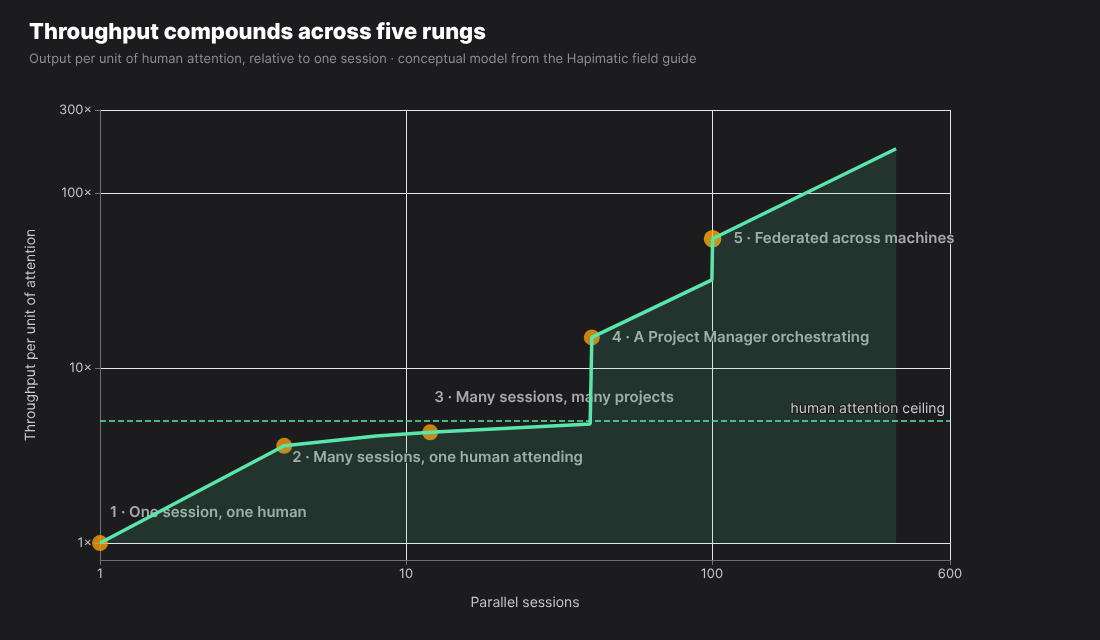
Five rungs from one session to a federated fleet; the human-attention ceiling sits between the second and third.
Rung one is one session and one human. Rung two is several sessions and one human attending all of them, which saturates at four or five. Rung three is many sessions across many projects with the workflow doing the attending. Rung four adds a Project Manager so the human supervises the supervisor. Rung five repeats all of it across many machines.
Analogy One car on a back road; a highway where you personally drive every car; the same highway with cruise control in every car; a traffic management center routing them; a network of highways across cities all running the same software.
Rungs one and two: a human attending
Linear with one session, compounding with several, then saturated at the number of plates one person can spin.
This is where most power users are today. It feels like a superpower and it is real, but the ceiling is your attention, and you hit it at a handful of sessions.
Rung three: the workflow attends
Many sessions across many projects, with the workflow doing the spinning, which requires durable state on every piece of work.
Once the state of each piece of work lives somewhere outside the session, sessions can be started, paused, and resumed without a person holding the thread. That somewhere is the work surface.
Rung four: a manager attends
A Project Manager session orchestrates worker sessions; the human supervises the supervisor.
This is the rung that breaks the attention ceiling. It requires an API through which one session can spawn, steer, and read the state of others, which is what the Project Manager is built on.
Rung five: many machines
Everything above, duplicated across federated machines, until coordination overhead or per-machine caps become the limit.
Each machine holds a bounded number of sessions. Adding machines adds lanes; the session list stays one list.
Throughput, not speed
A single issue through the pipeline is slower than a hand fix; the leverage is aggregate throughput that runs while you are elsewhere.
The workflow has overhead. A small fix that takes five minutes by hand can take fifteen minutes through the pipeline. But those are fifteen minutes nobody has to watch, and while they pass, five other sessions are also working. The system is not built for the quick targeted fix; it is built for the bulk of work, where the whole tide rises at once.
Under the hood
Each stage is at least one model turn carrying a large standing context (instructions, tool definitions, skill catalog, memory). Prompt caching bills that stable prefix at a fraction of the normal cost after its first write, which is why the overhead is affordable at scale.
Enough lanes, and managing the lanes
Scale is two separate problems: having enough lanes to hold the work, and managing what runs in them.
Lanes are sessions times worktrees times machines; that is the session layer's job. Managing the lanes is a different problem: one person can manage four, nobody can manage forty. That is the Project Manager's job. Solving the first without the second gives you a hundred terminals and no way to run them.
Under the hood
Spawn capacity per machine is the daemon's effective count (the larger of tracked processes and live terminal windows), about ten sessions per machine by default; more machines add lanes.
Attention elevated, not stretched
The human moves from issue-level oversight to portfolio-level supervision: stating intent at the front, verifying results at the back.
Under the fleet, the engineer's job changes shape rather than disappearing. You describe what you want and you confirm that what came back is what you wanted. The hardest five percent of decisions still come to you; the other ninety-five flow through.
What it is: a layer above the harness
A layer above the AI coding tools you already use, on the subscriptions you already pay for, that turns one-at-a-time sessions into a fleet.
Hapimatic does not replace your coding tool. It launches it, keeps its sessions alive, gives each one a durable place to work, lets many of them coordinate across machines, and puts the whole thing on your phone. Several properties have to hold at once for the layers above to work; this node opens into each of them.
Analogy A hand-drawn spreadsheet, Google Sheets, and a database are three different categories of object, not three qualities of the same thing. A chatbot you taught to run a test is the hand-drawn spreadsheet. The meta-harness is the database.
Model, harness, meta-harness
The AI, the app that lets it act, and the layer that runs many of those apps at once.
The model is the intelligence. The harness is the application that lets the model read files, run commands, and edit code. The meta-harness runs one layer above the harness, which is why it can run several harnesses side by side and several of your own accounts at once.
The model
The engine: Claude, or another frontier model.
The behavioral system is written in natural language against a harness, not against a model, so when a better engine ships it drops into the same car.
The harness
The app that lets the model act: Claude Code, Codex, Gemini CLI, and OpenCode are supported at launch.
A harness turns a model into something that can do work on a computer. The status of each supported harness is on the install page.
Under the hood
Each harness is described by a manifest that records how it launches and whether its sessions survive a restart of the background service. Gemini CLI and OpenCode sessions do not yet persist through that restart.
What the layer adds
Launch, persist, coordinate, surface, and schedule.
The meta-harness starts harness sessions, keeps them alive through everything, lets them see and spawn each other across machines, shows all of them in one app on any device, and runs them on a schedule when nobody is watching.
Sessions that never die
Server restarts, upgrades, crashes, reboots, API outages, and rate limits do not end a session; park work for weeks and resume.
Nothing above this layer can be trusted if a session can evaporate. A Project Manager cannot manage sessions that disappear, and a hundred sessions cannot be resumed by hand. So the session is the durable object, and the web server, the harness binary, and the network are all allowed to come and go around it.
Terminal-backed sessions
Each session is a real terminal session the harness runs as your own process, kept alive independently of the web server.
The session is not a browser tab and not a web-server object. It is a persistent terminal process on the machine. The app is a viewport onto it.
Under the hood
Sessions run under a terminal multiplexer through a launcher that keeps the harness attached as a terminal-driven process. The background service is split in two so a restart of the web server or the daemon leaves the terminal sessions running, and a recovery service rediscovers them on startup.
Reconnect and resume
A disconnected session reconnects to its full history; a running session can be switched to another of your own accounts and continue.
Close the laptop, lose the network, hit a rate limit, come back a month later, and the session is where you left it. Each account's own limits and terms apply.
Under the hood
The reconnect path tries a fast recovery first and falls through to a slower spawn-fresh path rather than failing; that fallback was removed once by an optimization and had to be restored, which is now a written rule. An account switch respawns the same session identity.
Every transcript, searchable forever
The complete record of every session stays on your node, searchable and recoverable by you or any agent.
A parked session is still valuable: another agent can be sent to read what was decided there and bring it back.
A fleet, not a box
Every session is a peer of every other: see it, message it, spawn it, on any machine you own or VM you run; all machines appear as one list.
The unit of delegation is a full, visible session, not a hidden helper. Because every session can spawn and steer any other, across every machine in your mesh, one agent can run a team.
Peer sessions, not subagents
A peer session is a full, visible, independent session; a subagent is a hidden, context-starved subordinate that fails silently.
When a session delegates to a subagent, the subagent gets a compressed summary and the caller's interpretation of the task, and when it fails it tends to fail quietly or claim success. A peer session is observable: you can open it, read its tool calls, and message it. Subagents keep one narrow lane: mechanical, verifiable, parallel work where a silent failure is obvious and retried.
Analogy A colleague at the next bench versus an intern in another building you cannot see.
Federation
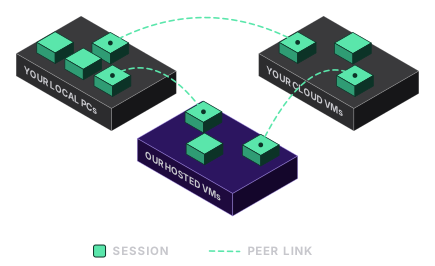
Machines join a mesh; a hub holds the session list, and any node can start a session on any other.
Add a second machine, a third, a cloud VM: the sessions on all of them appear in the same list and can message each other.
Under the hood
Nodes connect over a private mesh network on one port with hub, peer, and node roles. A registry caches every node's sessions, and any mutation proxied to another node updates that cache so every client sees fresh state.
Hosted nodes
A paid add-on of the hosted service. It is not part of the open-source core.
Cloud VMs join the same fleet; local machines become the interface to the bench.
Local machines cap how many nodes you can run, so the rest scales in the cloud, and the local machine is where the bench gear plugs in. The hosted service is in pilot.
One app on every device
The same app on phone, tablet, and desktop; the device is a viewport, the session lives on the server.
Start a session at the desk, nudge it from the phone in a queue, finish it on the tablet. Every tool call is visible, and a push notification arrives when an agent needs a yes.
Under the hood
A progressive web app with all session state server-side. Approval requests reach the phone as push notifications, and the answer goes back into the session.
A worktree per session
A new session on a repository is a new worktree, so several agents work the same repo on the same machine at once without collisions.
A worktree is a separate working copy of a repository on its own branch. In Hapimatic it is the default shape of a session on a repo: you do not set it up, it is simply how the session starts. This is the mechanism that turns one repository into many lanes.
The worktree lifecycle
Spawn creates the worktree and installs its dependencies; deleting a session soft-deletes it with a recovery window; expired ones are purged.
A deleted worktree is not destroyed. It moves to a holding area with its branch preserved for ten days, so a merged change that is later overwritten can be recovered.
Under the hood
Worktrees live beside the repository; the daemon installs dependencies at spawn; soft-delete uses a worktree move into a trash directory with a sidecar record; purge runs at spawn time and, optionally, as a daily collector.
A test instance per worktree
For Hapimatic's own development, each worktree also gets its own running instance and port, so a change is deployed and checked in isolation.
A UI change made in one worktree is built, deployed to that worktree's own instance, and checked with browser screenshots there, never on the shared development instance.
Under the hood
Each worktree claims a port from a fixed range and records it in a metadata file; a port claim counts as ownership whether or not the instance is running.
Collision avoidance
Before fan-out, a triage pass maps file overlap between issues so parallel sessions do not edit the same files; anything that slips through surfaces at pull-request time.
Parallel sessions on one repository are safe when they touch different files. A triage skill reads the open issues, predicts which files each will modify, and groups the parallel-safe ones; the closer detects merge conflicts as the final net.
On your own subscriptions
Sessions run the harness as your own process, signed in to your own accounts through the provider's own flow; Hapimatic sells no tokens and sits between you and no provider.
Because sessions are real terminal sessions, they bill against the subscriptions you already have rather than per token. Your model traffic goes from the harness to its provider, not through any Hapimatic server.
Account binding
Each session is bound to exactly one of your own provider accounts; a running session can be switched to another of yours; each account's own limits and terms apply.
Hapimatic keeps a per-account sign-in for every account you hold and runs every session on exactly one of them. Every account must be yours.
Usage visibility
A dashboard shows each account's remaining allowance for the current window; it changes no account's allowance.
A new session can start on the account with the most room. The pacing view is a readout, not a lever.
Scheduling that runs while you sleep
Recurring prompts inside a session, and scheduled events that start sessions on their own, with overlap rules, operating hours, exclusions, jitter, and backoff.
Two layers: a loop inside a session that re-runs a prompt on an interval, and an event scheduler outside any session that spawns a fresh session on a timer. The Project Manager's monitoring tick and the backlog sweeps run on these.
The key piece: the Project Manager
A paid add-on of the hosted service. It is not part of the open-source core.
An agent that runs the fleet: it takes a goal, spawns one session per piece of work, watches them, and brings you only the decisions that are yours.
The Project Manager is what moves you from a handful of sessions you babysit to a fleet you supervise. Hand it an epic and walk away. It plans, spawns, monitors, escalates, and reports, and the human is no longer in the critical path.
Analogy The traffic management center on the highway: it does not drive any car, it decides which cars go where and calls you only when a road is closed.
A role, not a special agent
The Project Manager is an ordinary session given a role; every session has the capabilities, the role is what differs.
Every session can list, spawn, message, and stop other sessions. Give one of them a few hundred lines of instructions on how to run a fleet and it becomes the manager. Role assignment is the differentiator, not a separate kind of agent.
Under the hood
The role is a skill. The capabilities are the session API, reachable from inside any session as a command-line tool and as typed tools: list, spawn, send, read messages, abort, archive.
The high-water mark: the productization run
The Project Manager running the productization program is the longest-running, heaviest-working session Hapimatic has ever had, and it is running as this is written.
It started on 2026-10-03 and has run for 26 days. As of 2026-10-29 it had accumulated 164 hours of agent time across 8,727 messages in its own session, spawned 72 peer sessions directly, and driven its program board to 389 of 520 items done. During the run the repository merged 559 pull requests and shipped 474 releases. These numbers are read live from the system and will keep moving until the board is complete.
Under the hood
Every figure comes from a command anyone with access can rerun: the session list ranked by accumulated server time and message count, the sessions whose parent is the manager, the board's status field counts, and the repository's merged pull requests since the start date. The readable map lists the exact commands.
The loop: plan, spawn, monitor, escalate, report
Five steps, each with its own mechanism, repeated on a schedule until the goal is met.
The manager reads the plan, starts one worker per issue, checks on all of them at intervals, brings you the decisions it cannot make, and reports when the work is done.
Plan
It reads the epic, orders the work by dependency, and finds what is safe to run in parallel.
Dependencies decide the order; file overlap decides what can run at the same time.
Under the hood
A triage skill produces the parallel-safety map; a sequencer writes a next state onto every card of a project board (ready, in progress, needs you, waiting, frozen) so the order is visible on GitHub itself.
Spawn
One peer session per issue, each in its own worktree, on whatever machine has room, named for its issue and linked to it.
Each worker starts with its issue as its default context, so 'work on the issue' means that issue without a number.
Under the hood
All spawning routes through one skill: it picks the node and launcher, selects the account with the most headroom, checks the machine's capacity, names the session at spawn, and links it to the issue.
Monitor
It checks every session on a schedule: what moved, what stalled, what needs a decision; it unblocks what it can.
The manager does not read transcripts. It reads the labels and handoff records on the issues, which is cheaper and more reliable, and it frees capacity by parking idle sessions.
Under the hood
A tick runs on the scheduler; each tick is one pass, and the next tick is the status check, so a tick never sleeps waiting on a job. Idle finished sessions are archived to free the per-machine slot.
Escalate
It brings you only the decisions that are yours, with the context to answer in one reply, and pings your phone.
A research plan that could not reach confidence, a risk threshold, a question only you can answer: these come to you in the manager's own session, as a detailed ask that says where, what, and how to reply.
Under the hood
The manager fills the human-approval slot at low-risk gates and relays the approval token itself. Pull-request operations are physically blocked while an awaiting-approval sentinel file exists, so a lost context cannot skip a gate. Notifications reach your devices as push messages.
Report
It reports in its own session when the work is done, with the evidence for each issue.
The report is the closing summary of each issue, gathered in one place, with the test proof attached.
Human on the loop
You are at the front (state the goal) and the back (verify the result), not in the middle.
Being in the loop means approving every step, which is safer and much slower. Being on the loop means the manager fills your slot at the routine gates and you keep the judgment calls. I do not take the system's word that the firmware works; I want the measurement before it ships.
Approval gates
Gates stay where you set them; low-risk, well-understood work flows through, risky or uncertain work pauses.
Risk and complexity are assessed when an issue is formatted; confidence is rated when it is researched. The combination decides which gates auto-pass and which wait for a person.
Under the hood
A sentinel file created at an approval checkpoint blocks pull-request creation and merge until a person approves and the file is removed; the approval is recorded with its provenance.
Decisions that never delegate
Merging to production, energizing hardware, and anything the research could not reach confidence on.
Some actions cannot be undone, and some judgments the system is not yet trusted with. Those stay with a person by rule, not by preference.
It stands on the substrate
The Project Manager could not be written for a bare harness; it needs everything below it.
A manager needs sessions that survive, an API to spawn and steer them, worktrees that keep them apart, a work surface to read their progress from, and a record of which session holds which issue. The manager is the keystone of an arch that had to exist first.
How it knows what to do: the behavioral system
The accumulated procedures and guardrails that make the fleet act well: skills, hooks, memory, and tools, built up over two years.
A manager is only as good as its procedures. The behavioral system is what turns 'do the right thing' into something repeatable: skills say what to do, hooks say what not to do, memory keeps it from starting fresh, and a tool catalog tells it what it can reach for.
Analogy AI without a framework is a brilliant new hire whose every day is the first day. The behavioral system is what makes it an employee.
Skills
A skill is a reusable, parameterized procedure written in natural language: the function of non-deterministic programming.
Most people think a skill is a saved prompt. The right mental model is a function: a procedure with parameters that produces the same kind of result every time, with enough room in the parameters that it is not a form letter. Skills compose into larger skills, and the Project Manager sits at the top of that stack.
Analogy An email-writing skill takes a tone, a length, and a pointer to the raw notes, and produces the email the same way every time.
The anatomy of a skill
A text file with a trigger description, the procedure, its parameters, and optionally the model it should run on.
The trigger description is what lets the system choose the skill from plain language; the procedure is the body; the parameters are what make one skill serve many cases.
Under the hood
A skill is a markdown file with a frontmatter block; the loader reads it in full, bypassing file-size limits, and a frontmatter model pin can run a mechanical skill on a cheaper model and revert on exit.
The skill hierarchy
Primitives compose into composites, and composites into orchestrators.
First came a skill to format an issue, then one to research it, then one for each stage. Then a skill that runs the whole workflow. Then sweeps that run a stage across a backlog. At the top, the Project Manager calls whichever primitives the job needs.
Analogy Functions calling functions.
The sweet spot
Too narrow is a macro; too broad is an omni-skill that does nothing well; the craft is the middle.
A skill that is literally the same every time is a macro. A skill with so many options that every run is completely different has no procedure left. The useful skill is specific enough to be nearly deterministic and general enough to be worth reusing.
Intent detectors
Plain language invokes skills: 'work on issue 42' is recognized and routed to the right skill with the right arguments.
You do not have to remember skill names. Detectors watch each prompt for intent and hand the session the exact invocation, including the session's linked issue when no number is given.
Under the hood
Detectors are prompt-submission hooks that inject a skill invocation; the session's linked issue is the default when the prompt names none, and an explicit number never silently re-links the session.
Hooks
A hook is a deterministic guardrail that fires on an event and can block an action: what you want the model not to do.
A skill gives the model a procedure, and sometimes at some fork it makes a choice you did not intend. When you ask why, there is a reason, usually a logical one, just a combination it had never faced. A hook is a small piece of ordinary code that catches that class of excursion and blocks it. Hooks are the bridge between deterministic code and a model that is not.
Analogy The bumpers in bumper bowling: you cannot leave the lane, and if you drift toward the gutter you are pushed back.
The anatomy of a hook
Hooks fire on events (before a tool runs, after it fails, when a prompt arrives, when a session starts or stops) and return allow or block with a reason.
Each event is a place the model's next action can be inspected before it happens. A blocked action comes back to the model with the reason, so it can take the allowed path instead.
Under the hood
All hooks register in one place, and a per-event dispatcher runs them in order; a validator catches a hook that is registered but missing, present but unregistered, or registered outside the single surface.
Three classes of hook
Guards block a class of mistake; detectors translate intent; enforcers protect invariants.
Guards: never a shallow fetch into a working repository, never a power-up recommendation without a cited schematic trace. Detectors: route plain language to a skill. Enforcers: checkpoint labels cannot be removed, no pull request while an approval is pending, no release with a test-version suffix.
The sweet spot, again
One omni-hook is impossible; ten thousand are unmanageable; a well-written hook catches a class, not an incident.
Badly written hooks pile up, one per edge case. Well-written hooks generalize: when you trace an excursion to its cause, you write the hook for the cause. There is no mathematical proof that a set of hooks is complete; confidence is earned by use.
The server-side gate
The trust-critical invariants are also enforced on the server, so a client that skips its local hooks is still bound.
Local hooks give instant feedback, but a different harness, or a session without them, would not run them. So the invariants that matter most are checked again where the work lands.
Under the hood
A repository workflow watches issue and pull-request events and reverts an illegal transition (re-adds a removed checkpoint, removes an illegal label, reopens an illegally closed issue) and comments; it ships in audit mode first.
Memory and standing instructions
Standing instructions and memory are what make the model an employee rather than a new hire every day.
Conventions, rules, past corrections, and references are loaded into every session, so the hundredth session knows what the first one learned.
The instruction stack
Layered standing instructions: global rules, per-project guidance, and the behavioral rules every session loads.
A global layer carries the rules that apply everywhere; each project carries its own; detail documents load on demand so the always-loaded layer stays small.
Project memory
A per-project memory of feedback, decisions, and references, indexed so the relevant part loads each session.
When the operator corrects the system, the correction is written down with its reason and how to apply it, and it is there next time. Memory is one fact per file with an index that fits in the standing context.
Under the hood
The index is capped in size so it can load every session; sub-indexes are read before the kind of work they cover.
Tools as capabilities
Every command-line tool on the machine is one install away from being a capability; a catalog with trigger keywords tells the model when to reach for each.
Media tools, document converters, secret scanners, board compilers, instrument drivers, cloud CLIs: once a tool is cataloged with the phrases that call for it, the model reaches for it from context.
Under the hood
The catalog is generated from one source file into the always-loaded instructions. A command-line tool costs no standing context, where a connector server costs its whole tool schema every turn, so connectors are off by default and enabled per task.
The behavioral system is a repository
The skills, hooks, memory, and instructions are one Git repository that develops itself through its own workflow and distributes itself to every node.
Improvements to the methodology are issues against the methodology repo, processed by the same pipeline. Every machine in the fleet pulls the same repository, so behavior is uniform across the fleet.
Where the work lives: the work surface
A paid add-on of the hosted service. It is not part of the open-source core.
Every unit of work is a GitHub issue carrying its state, plan, and evidence, moved through a state machine that only advances; the issue outlives any session.
In a chatbot the work lives in the conversation. Here it lives on the issue: the request, its structured form, the plan, the commits, the test proof, the review, and the closing summary. The session is disposable; the issue is not. This is the safety net, the connective tissue between sessions, and the audit trail.
Analogy The archive room of a research lab: every experiment filed in a uniform, retrievable format. The bench can break and the researchers can leave; the archive is what makes the lab continuous.
The issue is the unit of work
One issue, one unit of work: the request, its structured form, the plan, the commits, the test proof, and the closing summary, all attached.
Everything a later session needs to continue the work is on the issue itself, not in anyone's memory.
What is on the issue
The formatted template with requirements and acceptance criteria, risk and size, the research plan, the test plan, the evidence, and the closing summary.
Each stage leaves a structured handoff for the next. The implementation plan is attached as a durable file at a known location, so a fresh session on another machine can build from it.
Under the hood
Each handoff is a machine-readable envelope in a comment; plans and evidence are committed under an assets path keyed by issue number; the single-version rule keeps one live plan per issue.
State lives in the body
Requirements and decisions live in the issue body, never in a comment, because the workflow reads the body.
A comment has no lifecycle hook that forces it to be consumed; a body edit does. So scope changes and decisions go in the body, and a comment carries at most a pointer to the edit.
Under the hood
A hook denies a comment that carries requirements, acceptance criteria, scope changes, or decisions, with a bypass only for the marker-tagged comment classes the workflow itself writes.
The state machine
Formatted, researched, implemented, tested, closed: each stage applies a permanent label, and the labels only move forward.
Any session, on any machine, can look at an issue and know exactly where the work stands. The workflow defines structure, not content: it does not care whether the issue is a firmware bug or a website change, only that it moves through the same stages and leaves the same evidence.
Analogy A word processor does not tell you what to write; it gives you pages, headings, and change tracking. The workflow is the page, not the paper.
The six stages
Creator, formatter, researcher, worker, tester, closer: one skill per stage, with an optional expert review and a reflection pass before the approval gate.
The creator captures intent. The formatter applies the template and assesses risk and size. The researcher reads the code and writes the plan with a confidence rating. The worker implements and self-verifies. The tester verifies through the user's channels. The closer reviews, merges, cleans up, and summarizes.
Three kinds of label
Checkpoint labels are permanent and accumulate; lock labels give one session exclusive hold; agent labels say who is driving.
Checkpoints record progress and cannot be removed. Locks prevent two sessions from working the same issue at once. Agent labels show which session currently holds it.
Under the hood
A hook refuses removal of a checkpoint; the server-side gate re-adds one that is removed anyway.
Confidence gates
The researcher rates its own confidence; below ninety percent it researches again, up to three times, then asks a person; low-risk, high-confidence work hands off automatically.
The most expensive judgment in the pipeline happens before any code is written. The plan is reviewed at the front, where a wrong assumption is cheap to catch, rather than at the back, where the model has amplified it.
The tester impersonates a user
The tester verifies through the user's channels (a real browser, the deployed instance), never the worker's, and bounces failures back.
Different channels expose different bugs. The tester refuses developer shortcuts: no injecting test data through an API to make a screenshot look right. If the user would click it, the tester clicks it.
Under the hood
Browser automation drives the deployed worktree instance; a verification that bypasses the UI path is a rule violation with a recorded trigger case.
The closing sequence
Closing summary, commit, push, pull request, self-review, CI, merge, branch delete, cleanup, report.
The closer lands the work cleanly and leaves no exhaust: the issue gets its summary, the branch gets merged and deleted, temporary files are swept, and the version is allocated after the merge so two closers never collide.
Goals made of issues
A small goal is an issue; a large one is an epic set: a parent issue that orders its sub-issues, as a milestone in one repo or a board across several.
The Project Manager consumes an epic set as its instructions: the epic's goal is the high-level goal, and its sub-issues are the work to spawn.
Under the hood
An organizer reconciles the five places an epic's membership can drift (sub-issue links, the epic body, milestone or board membership, child labels, body claims versus state); a sequencer keeps a board in dependency order with a next state on every card.
Safety net, connective tissue, audit trail
Three consequences of the work living on the issue rather than in the session.
Each is a reason a chatbot cannot do this job.
Safety net
A session can crash and a machine can reboot; the next session reads the issue and continues from its last checkpoint.
Compaction of the model's own context, a crashed process, a dead network: none of them lose work, because the work was never only in the session.
Connective tissue
Sessions coordinate through the shared issues, labels, and branches rather than through conversations.
A hundred sessions on one repository do not need a hundred conversations. They read and write the same work surface.
Audit trail
Six months later, 'when did we change that, and why' is a search; anyone with repo access sees what is being worked and in what state.
A client, a manager, or a reviewer reads the record without asking anyone. The evidence is attached, not described.
It seeds into an existing repository
With issues already in progress; no preparation necessary.
If you already work in Git you already have the substrate. The workflow adds its labels and templates to the repository you have.
Why it reaches the bench: closing the loop on hardware
A paid add-on of the hosted service. It is not part of the open-source core.
The test-and-iterate loop extends onto the workbench: the agent sees the board, drives the instruments, flashes the firmware, and a bug is not fixed until a measurement says so.
The hardest part of applying AI to hardware is that the result is physical. If the agent cannot see the LED or measure the rail, a person has to look and type the number back, and the person is the bottleneck again. So the test stage of the workflow extends onto the bench, and the same loop that verifies software verifies hardware.
Analogy A thermostat is a closed loop: measure, compare, act, measure again. The bench loop is the same shape with an engineer's instruments as the sensors.
Why hardware is hard for agents
The result of hardware work is physical; without senses, the person is the sensor and the bottleneck.
An agent without senses reasons from the schematic alone and tells you what should be happening. With instruments in reach it measures what is happening: the real rail at power-up, the real current in sleep, the real edge on the bus.
The loop: observe, measure, reason, change, iterate
Five steps around the device, repeated until the readings say the bug is gone.
Look at the board through the camera. Capture the waveform or the current. Trace the net in the schematic and read the datasheet. Edit the firmware or the design and flash it. Measure again, compare before and after, and go around while the readings are still wrong.
Senses
A pan-tilt-zoom camera over the bench, an oscilloscope, an electronic load, a power profiler, a metered supply, and a serial console.
Each physical question has a sense that answers it: is it powered, what is on the screen, how much current, what does the signal look like. Looking is free and always allowed.
Under the hood
A sensorium map pairs each physical unknown with its exact invocation, and a standing rule forbids any claim about physical state without a preceding sensor read; a silent channel (a failed ping, a timed-out login) is never taken as evidence that a device is off.
Hands
A programmer and debugger probe to flash, instrument control over the instruments' own command protocols, and switched bench power.
The agent can change the firmware on the board and change the instrument settings; it cannot energize anything without a person.
Proof by measurement
Before-and-after captures under the same conditions, attached to the issue; a test that cannot reproduce the failure is treated as not understanding the bug.
A fix is not a sentence saying the bug is gone. It is the mechanism of the bug stated, the mechanism of the fix stated, and the capture that proves it. When the test passes but the reported failure cannot be reproduced, that is evidence the bug is not yet understood, not a pass.
Learning an instrument
Give it the manual or the model number; it finds or writes the driver, works out the protocol, validates every method on the real hardware, and catalogs the instrument as a capability.
Anyone can teach a coding assistant to drive one logic analyzer. The difference is a procedure that learns any instrument the same way and remembers the result, so the next time a job calls for that instrument the system reaches for it without being told.
Analogy The scene in The Matrix where the cable goes into the back of Neo's head and a moment later he says 'I know kung fu'. Say 'learn this oscilloscope', and a while later it is an expert in it, permanently.
The learning procedure
Find the programming manual; author the driver from it; validate each method against the hardware; fix the divergences the hardware surfaces; register it.
The manual says what the instrument should do; the bench says what it does. The gap between them is where every driver's bugs live, so validation on the real instrument is the gate.
Under the hood
A skill runs the phases; drivers share one typed interface; a validation script exercises every method on the hardware; the instrument lands in the lab-equipment map and the tool catalog.
A cataloged capability
Once learned, the instrument is reached for from context: an issue about power pulls in the profiler without being told.
Because the capability is in the catalog with the phrases that call for it, 'do the diagnostic work' is enough. The system knows the profiler is the right tool, knows it knows how to use it, and asks you to set it up.
Electronics skills
Schematic and PCB review with lint, renders and 3D review, BOM and parts database, fabrication outputs, Altium and Eagle conversion to KiCad, SPICE and firmware simulation, firmware build and flash.
The loop runs from symptom to fix: trace the net, read the datasheet, diagnose, change the firmware or the design in the EDA tool, order the boards. The skills carry it through.
Under the hood
A design doctrine with a read-only lint gate (clean, blocking, or tool error as exit codes) and a render-and-look step after every edit to a schematic or board, because a text-level edit can be syntactically valid and visually wrong.
Bench safety
Looking is free; changing the physical world is gated: switching on power waits for a person, and a power-up recommendation without a cited schematic trace is blocked.
The functionality is what engineers ask about; the safety is what the people who approve budgets ask about. The answer is that the gates are in the execution path, not in the prompt.
Four tiers of action
Sensing and camera moves are always allowed; defensive actions such as cutting power are allowed with a duty to notify; world-changing actions are human-gated.
The policy is graded by what can be undone. Reading never needs permission. Removing power to stop harm is allowed but must be reported. Applying power waits for a person.
Gates in the path, not the prompt
A prompt injection cannot energize a board, because the check is not a sentence the model reads but a step it cannot skip.
The rule that blocks a power-up recommendation without a cited schematic trace came from the system's own mistake: it once called a setup safe without checking the drawing. The rule is a hook, not an instruction.
Why hardware is the wedge
No other reviewed meta-harness has physical senses; this is the capability a general-purpose agent will not offer.
A general-purpose agent will book you a table and send your email. It is not going to turn a servo, read a display, or drive an oscilloscope, and it is certainly not going to remember how. This is where a framework built for engineering work separates from a very good chatbot.
Why it gets better: the loop that runs on itself
The methodology hardens through use: every mistake becomes a guardrail, and every repeated guardrail becomes an upstream fix.
Regulated industries call the pattern corrective and preventive action. Every defect becomes a permanent improvement to the process, and over enough iterations the system hardens against its actual failure modes rather than an imagined set.
Analogy A production line whose defect rate falls over time because the line absorbs its own lessons.
The hook lifecycle
Mistake caught, hook added; hook fires repeatedly, trace upstream; root cause fixed, hook retired.
The first stage is corrective: block the specific mistake. The second is preventive and more important: if the hook keeps firing, the cause is structural, so fix the skill or the instruction that keeps sending the model down that path. The third is hygiene: once the fix holds, the hook's firing rate drops to zero and it is deleted.
Under the hood
An analytics panel counts hook firings per hook and per session; it is the dataset that says which hooks to trace upstream and which to retire.
It uses itself to improve itself
The methodology repository is processed by its own workflow; the same pipeline that improves client work improves the methodology.
A skill that needs refining is an issue, researched, implemented, tested, and closed by the skills it is about. The presentation that explains the system was built the same way.
The evidence
As of October 11, 2026, the project's own repository had 1,012 issues labeled as bugs, 735 of them closed.
Every one of those is a failure mode that was caught, recorded, and turned into a fix, in the record, where you can read it. A system that never files a bug against itself is not a system that never fails. It is a system that does not notice.